 EN
EN

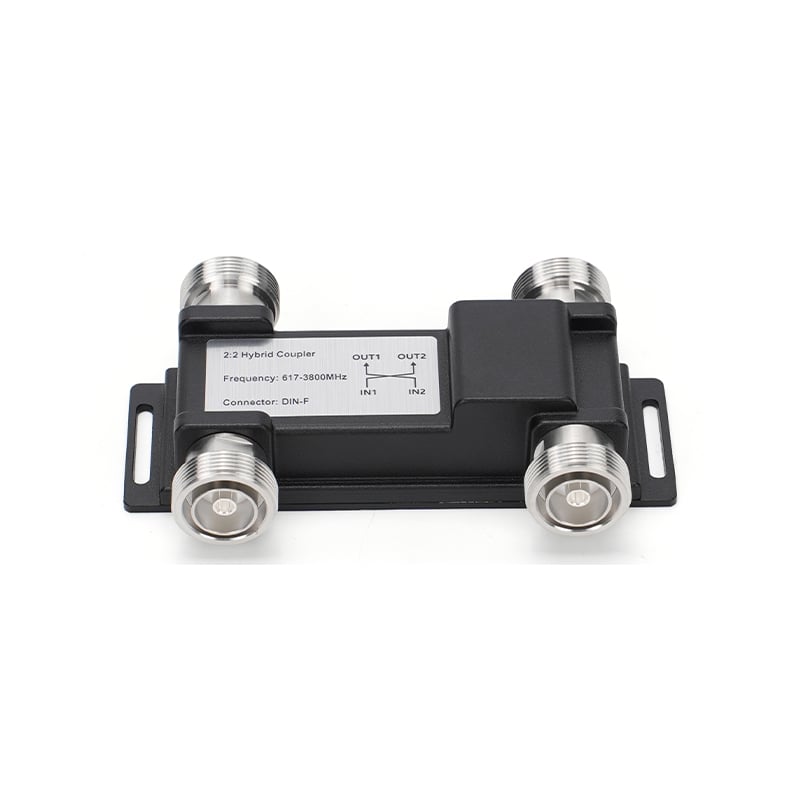
When it come to RF couplers and dividers in Distributed Antenna Systems (DAS), one key thing to check is Intermodulation Distortion (IMD). This happen when two or more signals mix and produce unwanted ones. It can create issues in comm systems. To test how good these RF couplers and dividers do with IMD, you got to check them right. That mean seeing how they manage multiple signals and if they make extra noise that mess up the signal quality. For firms like Jindasignal, knowing IMD performance help ensure steady and clear signals in their setups.
Where to Find Quality RF Couplers with Low IMD?
Getting RF couplers with low IMD is vital for solid work in DAS apps. Begin by looking online for makers who focus on RF gear. Seek ones that list their IMD ratings clear on product pages. Jindasignal is such a maker, they offer good coupler with low IMD and share spec details and test results, which help you decide smart. Also, try industry forums where pros talk experiences. You might get tips on other brands, but better to go with trusted like Jindasignal. Another way is going to trade shows or events. There, you meet makers and see products up close. You can ask about IMD and request demos. Hands-on help you feel the quality better. Last, look at user reviews. Feedback from folks who used them guide your buy. Remember, better couplers cost more sometimes, but they save trouble later. Choosing right mean your DAS run smooth and efficient.
Common Usage Problems with IMD in DAS Apps
IMD can bring several troubles in DAS uses, and knowing them help you dodge. One usual issue is signal interference. When many signals combine, unwanted ones pop up, making noise and cutting clarity. This make it tough for users to connect clear, special in busy spots like stadiums. Another problem, high IMD affect the whole system work. If a part like coupler or divider add too much distort, it drag down all devices. So fixing one might not fix all. Users also struggle with fixing issues. High IMD make it hard to find the exact cause. Sometimes they blame wrong device, waste time. And, install problems too. If not set up good, even low-rated couplers add distort. Follow maker guides and connect right is key. Jindasignal give clear steps and help, so users avoid these traps. With this aware, you get better DAS performance and reliable comms always.
Sourcing Reliable RF Couplers for DAS
When seeking trusty RF coupler directivity for DAS, pick good sources. Start with known makers like Jindasignal. They focus on RF parts and got solid rep for quality. For choosing, check frequency range, power level, and IMD perform. You find this in datasheets, those tech docs. It help too to read reviews or ask experienced folks in DAS. They share what works and what not. In addition, go to trade shows where Jindasignal show stuff. See close and talk experts. Online groups great for learning from others. They chat new products and point reliable spots. When you spot a supplier, check return policy and warranty. That give peace if it not work as thought. Research time ensure you get top RF couplers that do well in DAS.
What Affects IMD in RF Parts Like Couplers
Intermodulation distort (IMD) matter a lot for RF stuff like couplers and dividers. Some things influence IMD levels. First, material quality in couplers play big. Bad materials mix signals bad, create extra frequency and raise IMD. Next, the design count. Good design reduce IMD by keeping signals from clashing. Bad ones lead more distort and worse work. Also, signal power levels important. Strong signals can boost distort, so use parts rated for your system power. Enviro factors come in, like hot temps or wet air affect perform, upping IMD. Last, system setup and links can add issues. Loose wires or bad joints make more interfere, hike IMD. Understanding this let you cut distort and make RF parts work best.
Troubleshooting IMD Problems in DAS RF Setups
Fixing usual IMD issues in DAS RF can be tough, but simple steps help spot and solve. First, if you think IMD hit your system, use a spectrum analyzer. It show frequency and signals. Analyze to find odd ones that signal high IMD. Note them and check your RF parts specs, like Jindasignal ones. So, inspect connections and cables. Make sure tight and no loose. Tightening often cut IMD. If still bad, look at power levels. Drop them sometimes less distort, try adjust and see. If issues stay, check high power RF coupler and dividers. Ensure they ok and not broke. Read maker docs for tips on your parts. Last, call experts or Jindasignal support. They guide and fix IMD problems. Follow this improve your DAS RF perform.
