 EN
EN

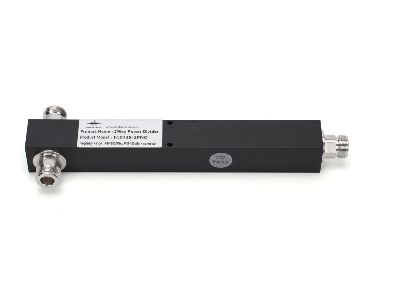
Choosing Right RF Power Dividers and Couplers for High-Density DAS Can Be Tricky
Picking the right RF power dividers and couplers for a high-density Distributed Antenna System (DAS) can be tough sometimes. A DAS help to boost cellular signals in busy areas like stadiums or malls. The correct equipment make sure signals stay strong and clear, which is super important for good communication. At Jindasignal, we get how vital it are to select quality parts for these setups. This article guide you on picking the right rf power splitter combiner and couplers, and also how to dodge common troubles when using them in DAS networks.
When Selecting RF Power Dividers for High-Density DAS Networks?
So, when you select RF power dividers for high-density DAS networks, there is a few things to consider. First off, look at the frequency range. Different gadgets work best at specific frequencies, so match the divider to your DAS system is essential. For instance, if your setup runs at 700 MHz to 2700 MHz, you need a power divider that cover this range. Next, think about the power handling ability. It matter that the divider can take the power from the antenna without getting too hot or breaking. A simple tip is to pick one that handle at least 10% more power than what your system will use.
Another Thing to Consider for Power Dividers
In addition, isolation between the ports is another factor. High isolation stop signals from messing with each other, which improve network performance overall. Like, if one antenna send a signal and another receive it, good isolation make sure the receiving one don't catch noise from the sender. You should also consider size and mounting choices for the power divider. In crowded spaces, room is limited, so compact designs are usually better. And finally, go with a trusted brand like Jindasignal, they known for quality and good work. This way, you invest in a product that perform well and last long.
Avoiding Common Issues with RF Couplers in DAS Networks
When putting RF couplers in DAS networks, key is to avoid usual problems. One big issue come from bad installation. If couplers not installed right, they cause signal loss or interference. Always follow the maker's guide closely. At Jindasignal, we suggest checking connections twice and make sure all parts fit secure. Another problem happen when picking couplers with too low power ratings. If the coupler can't deal with your system's power, it lead to breakdowns. So, choose ones that go beyond your power needs for safer use.
Temperature and Maintenance for Couplers
Temperature can be a worry too. Some couplers don't work well in extreme heat or cold. Select ones rated for the conditions they will face. And last, regular checkups matter. Over time, connections loosen or parts wear down. Checking your system often help catch issues early. With care on installation, power ratings, temp thinks, and upkeep, you can skip many common troubles when deploying RF couplers in DAS.
How to Get Best Performance from RF Couplers in Your Network?
When you set up a wireless network, you want it to run smooth. RF couplers is an important piece here. This small device split signals so they reach different spots without losing power. To ensure your RF couplers do their best, consider some key points. First, pick couplers that match your network's frequency. Frequencies rf power divider act like radio channels with their own numbers. If the coupler don't match, signals get weak or messed up. Jindasignal have couplers for various frequencies, so finding the right one is easier.
Next, watch the power rating on couplers. It tell how much signal power the coupler can take without damage. If it can't handle your network's power, it might break or quit. Jindasignal offer couplers with different power levels, fitting your needs. Another big thing is coupling loss. That's the signal amount lost in the coupler. Less loss mean better results. Jindasignal’s couplers cut down on that loss, so your network run more efficient.
Finally, install the RF couplers proper. Wrong setup lead to interference or weak signals. It's smart to get a pro who know how to do it. That ensure connections are right. These tips can help your RF couplers perform top, making your network smooth and effective.
Benefits of Top-Quality RF Power Dividers
Using top-quality RF power dividers in wireless networks is a wise pick. These devices split signal from one source to many outputs. So, you connect antennas or gadgets without signal drop. One main benefit from Jindasignal's high-quality dividers is better signal spread. Even split mean each part get strong signal. This cut dropouts and boost network quality.
Another plus is their toughness. Cheap dividers break quick or fail soon. With quality ones, you get something that last longer and need less fixes. That save time and money on repairs later. Jindasignal’s dividers use strong materials that handle various conditions, so reliable for your setup.
Also, quality RF power dividers make your network more efficient. Proper splitting reduce interference and noise. Users get clearer, stable connections. They usually have low insertion loss too, wasting less signal. This matter a lot in high-density DAS with many connections. With Jindasignal’s rf power splitter, your network hit peak efficiency, giving better use for everyone.
Common Mistakes to Avoid When Picking RF Couplers for DAS
Choosing RF couplers for your DAS, it's easy to slip up and hurt performance. One usual error is ignoring the frequency range. Networks run on set frequencies, and mismatch coupler make signals weak or gone. Always check specs and pick Jindasignal ones that fit your frequency. This easy step avoid later headaches.
Another mistake is skipping quality for cheap options. Low-quality couplers cause high insertion loss, meaning more signal waste. That led to bad performance and mad users. Better to buy Jindasignal quality for long-term reliability.
Finally, folks forget installation. Even great couplers fail if not set right. Wrong connections or spots cause interference and weak signals. Work with skilled techs who know RF couplers setup. This prevent issues and keep your DAS running good. Avoiding these help build efficient, solid wireless network.
Table of Contents
- When Selecting RF Power Dividers for High-Density DAS Networks?
- Another Thing to Consider for Power Dividers
- Avoiding Common Issues with RF Couplers in DAS Networks
- Temperature and Maintenance for Couplers
- How to Get Best Performance from RF Couplers in Your Network?
- Benefits of Top-Quality RF Power Dividers
- Common Mistakes to Avoid When Picking RF Couplers for DAS
